Everyone
sees the same score.
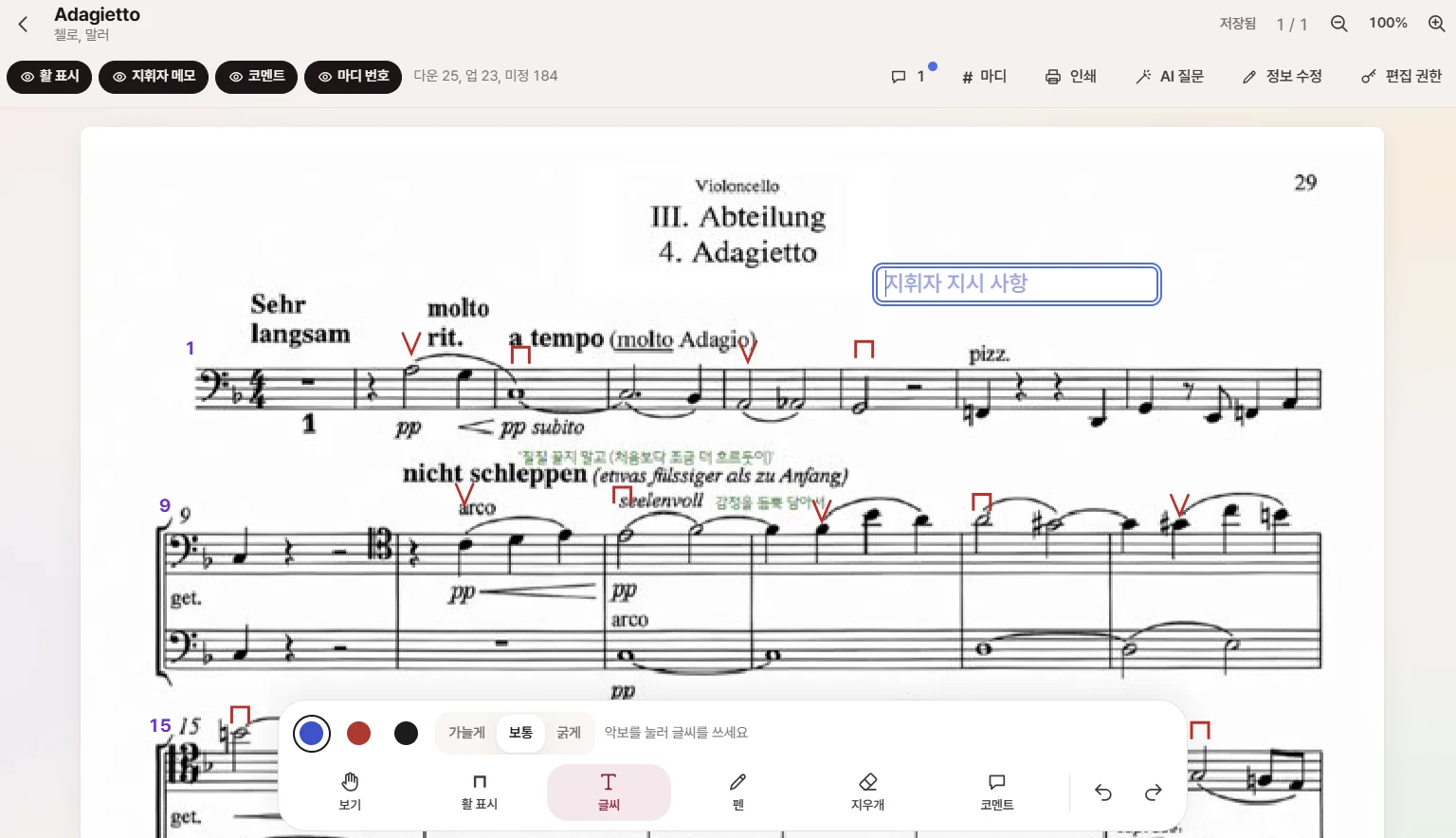
The latest section scores, conductor instructions, string bowings, and bar numbers, automatically in one place. See who's coming this week and the stage seats too. OrchMate, the app for orchestras, choirs, and ensembles.
All features freeiPhone app launched · Also works right on the web
This week's practice,
you can already see who's coming.
When members tap attending, their names take their stage seats. Only people who haven't replied get reminders, and organizers don't have to count.
On members' phones
With one app
Ready for rehearsal.
Open Home and you'll first see the concert countdown, notices, this week's rehearsal, and the attending button. One tap on the arrival button when you reach the rehearsal room. Add it to your home screen and you'll get notifications like an app.
OrchMatePhilharmonic
YoonRegular concert is 6 weeks away! Starting this month we'll rehearse the full program every week. Please be sure to get the latest section scores 🎻
This week's practice In 3 days
Nov 7 (Sat)
10:00 AM–1:00 PM OrchMate rehearsal room
Are you attending? By Thursday
🍻 Pre-concert pep dinner · Nov 7 (Sat) afternoon
Please vote on the venue!
Is passing around scores and counting heads eating into your rehearsal time?
Posting a new score PDF in the group chat, then "Which one is the latest?"
Section scores always in one place, always the latest
Writing down the bowings and breath marks the conductor mentions, each in your own pencil
Mark it once and it shows on everyone's section score
"From which bar? Where's B?"
Rehearsal letters and bar numbers on the score. Jump right to the spot
Posting 'Who's coming this week?' in the group chat and counting each reply
One button for attending, late, or absent. Reminders only for those who haven't tapped
Redrawing the seating chart on the morning of rehearsal
Attending members' names sit in their stage seats on their own
Each group has its own separate space and data. Your group's information is seen only by your members.
What one group needs
Turn on only the features you need. Tap 'View screen' to see the actual app screen.
악보와 연습
같은 악보를 보며, 같은 방향으로.
출석과 무대
누가 오는지, 어디에 앉는지.
모임
단원이 많아도 놓치는 사람 없이.
- 안내악기 수리점, 소모품 가게, 단원들이 아는 곳
음악 즐기기와 운영
연습이 없는 날에도, 운영진의 일은 줄이고.
- 악기 도감다른 악기는 시작하면 어떤지 — 비용·로드맵·첫 음계를 실제 악기 소리로
- 클래식 공연가까운 공연 소식과 함께 갈 사람
- 가입 승인·권한구글·애플 로그인, 운영진·파트장 권한
- 단체별 기능우리 단체에 필요한 기능만 켜기
- 캘린더·백업연습 일정을 휴대폰 캘린더로, 단체 데이터는 관리자 메일로 백업
A week with rehearsal
Whatever day rehearsal falls on, members tap a few buttons and organizers just check. This is how a week goes for a group using OrchMate.
- D-5
Notices and scores
Organizers post this week's pieces and notices. Members open that piece's section score and recording right from Home.
- D-3
Tap attending
Members tap attending, late, or absent on Home. Their name sits in a stage seat right away.
- D-2
Reminders only for those who haven't tapped
Only members who haven't replied by the deadline are notified automatically.
- D
Arrive at rehearsal
One tap on the arrival button when you get to the rehearsal room. Organizers see who's here at a glance.
- D
After rehearsal
The bowings and breath marks the conductor mentions go on the score, and comments and videos are kept by date, carrying over to the next rehearsal.
Get your group started
1
Register
Write your group's name, contact person, and the features you want. It takes 3 minutes.
2
Open your address
After review, your group's own address (yourgroup.orchmate.com) and space open up. Your data never mixes with other groups.
3
Invite members
Post the address in your group chat, and members come in with a Google or Apple account, with no installation, and enter their name and section. Once the organizers approve, you're done.
4
Adjust as you go
Send what's inconvenient and the features you want through 'Request to OrchMate' in the app. They go in as early as that day, and within a few days at the latest.
Features that appear when you ask
OrchMate is growing right now, used every week by real members. If you think "it'd be nice to have this," tell us. Good ideas can go in the same day. Not an update months from now, but before your next rehearsal.
Because it's on the web, there's no waiting for updates or reinstalling. The new feature is already there the next time you open it. Features only your group needs are fine too.
- 1
Leave feedback
Write the feature you want in 'Request to OrchMate' in the app or on the registration form.
- 2
Reviewed right away
The team reads it right away; if the feature already exists we turn it on for you, and if not we build it.
- 3
Applied right away
Once it's built, it's already there the next time you open it. Usually a few days, and as early as that day.
₩0
Free to use
No sign-up fee, no monthly fee. Free for all members.
- Scores and conductor markings
- View other sections' scores
- Attendance and reminders
- Seating chart
- Notices · Rehearsal comments
- Dues · Social event bill splitting
- Tuner · Metronome
- Practice with AI (beta)
Features that use AI, like Practice with AI, are in beta and free for now. If one becomes paid later, we'll tell you 30 days ahead, and your group decides whether to use it.
Apply to register for freeThe same group, anywhere
The iPhone app is out. Even without the app, just open the web address and it works the same.
On the web, no installation Right now
Open your group's address (yourgroup.orchmate.com) on a computer or your phone's Safari or Chrome and use it right away. You get rehearsal reminders too.
- iPhone: In Safari, tap the Share button → 'Add to Home Screen' and it opens like an app.
- Android: Chrome menu → 'Add to Home screen' or 'Install app'.
- Computer: Handy for viewing scores large or organizing dues and the ledger.
As an app iPhone launch
Get OrchMate from the App Store. It's the same account and data as the web, so there's nothing to move. The Android app is being prepared for release on Google Play.
Guide
See all posts →We've gathered the things you actually run into when running a group, taking lessons, and practicing.
How to manage club dues: monthly dues, concert fees, and exemptions without the confusion
A guide to managing dues for treasurers of amateur orchestras and choirs: types of dues like monthly dues, annual dues, concert fees, and camp fees; what to decide at the start of a season; deposit-name rules; unpaid reminders; and sharing the ledger.
5 min readRunning a groupManaging section scores: 5 principles to end 'Which one is the latest?'
Score PDFs piling up in the group chat, and everyone copying down bowings and breath marks by hand. How an amateur orchestra can keep the latest section scores in one place and share conductor markings, plus things to watch for on score copyright.
5 min readRunning a groupRegular concert checklist: from D-90 to concert day
If you're in charge of a regular concert for an amateur orchestra or choir for the first time. We've laid it out by timing, from booking the venue and finalizing the program (D-90), through sharing information (D-14), the dress rehearsal and day-of timetable, to settling accounts after the concert.
7 min readFAQ
How much is OrchMate for groups?
It's free. No sign-up fee, no monthly fee, and free for all members. If a costly feature like AI becomes paid later, we'll announce it 30 days ahead, and your group decides whether to use it.
How do members join?
Once you register, your group gets its own address (yourgroup.orchmate.com). Post that address in your group chat, members log in with their accounts and enter their name and section, and once the organizers approve, they're in.
Can choirs and ensembles use it too?
Yes. The seating chart supports orchestra, chamber, choir, and wind band layouts, and section names adapt to the type of group.
Won't our data mix with other groups?
Each group has its own separate space. Only your group's members can see your group's scores, attendance, and notices.
Do I need to install the app?
It works right on the web. Open your group's address in Safari or Chrome on your phone and add it to your home screen, and it opens like an app and sends practice reminders. On iPhone you can also get the app from the App Store.
What if a feature I need is missing?
Write it in 'Request to OrchMate' in the app or on the registration form. The team reviews it right away, and features we can build may go in as early as that day.
Join in from the next rehearsal